When buying a home in Clermont County, Ohio, estimating property taxes before closing is an important part of budgeting. Property taxes vary depending on the property’s assessed value, location, school district, and local levies. Knowing what your tax bill might be helps you avoid surprises and plan for ongoing costs.
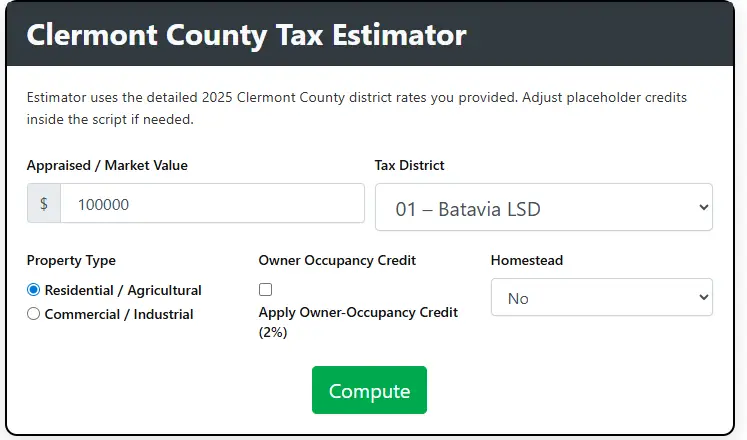
Clermont County Tax Estimator
Estimator uses the detailed 2025 Clermont County district rates you provided. Adjust placeholder credits inside the script if needed.
How to Work Our Tax Estimator Tool
We created our Clermont County Tax Estimator to make calculating property taxes simple and fast. Users can enter the property market value, select a tax district, and apply credits. The tool quickly gives a clear estimate of tax liability. It is designed for homeowners, buyers, and investors to get reliable information without any confusion.
Enter Appraised or Market Value
Start by entering the market or appraised value of the property. This represents the current worth of the property. The tool uses this value to calculate taxes based on the district rate, property type, and any credits. Entering the correct value helps get a realistic tax estimate quickly.
Example
Market Value one hundred thousand dollars will give an instant estimate based on the inputs
Select Tax District
Choose the tax district where the property is located. Each district has its own tax rate. Selecting the correct district ensures the calculation matches the official county rates. The tool uses the district rate to give a precise estimate. Choosing the wrong district may lead to incorrect results.
Example
District zero one Batavia LSD applies eighty three point three mills per thousand dollars of assessed value
Apply Property Type and Credits
Select whether the property is residential or commercial and apply owner occupancy or homestead credits if eligible. The tool reduces the tax based on these selections. This helps give an estimate that is closer to what you will actually pay. Applying the correct options ensures accuracy.
Example
A residential property with owner occupancy and homestead credits will show the adjusted estimated tax immediately
What Our Tool Provides
After entering all the information the tool gives a complete breakdown of your estimated taxes. It shows the appraised value, assessed value, mills used, tax before credits, applied credits, and final estimated tax due. The results help homeowners and buyers understand their potential property tax liability clearly and quickly.
Appraised Value
The appraised value is the market worth of the property. This includes the land and any improvements. The tool uses this value to calculate assessed value and estimate taxes. Knowing this value helps users understand the property financial starting point.
Assessed Value
Assessed value is a portion of the appraised value used for tax calculation. In Clermont County it is thirty five percent of the market value. This value determines the amount of property tax before any credits are applied.
Mills Used
Mills are the tax rate applied per thousand dollars of assessed value. The tool multiplies the assessed value by the district mill rate to calculate the base tax. This helps users see how the local rate affects the tax amount.
Tax Before Credits
This is the total property tax before applying owner occupancy or homestead credits. It shows the full liability based on the assessed value and mill rate. This helps users understand the base tax before any reductions.
Owner Occupancy Credit Applied
This credit is for homeowners who live in the property. It is usually a percentage of the base tax. The tool calculates this automatically if selected. It shows the potential savings for eligible owners.
Homestead Credit Applied
Homestead credits provide a fixed reduction for eligible property owners. This includes regular homestead and disabled veteran credits. The tool subtracts this amount from the tax to show the adjusted liability.
Estimated Tax Due
This is the final estimated tax after all credits are applied. It shows what the homeowner may expect to pay. The tool provides a clear and instant result so users can plan their payments and budget effectively.
Conclusion
Estimating property taxes in Clermont County before buying a home is an essential part of planning and budgeting. By understanding assessed values, local millage rates, and additional levies, you can calculate a realistic estimate of your annual taxes. Using official county tools, including the Auditor’s property search, GIS mapping system, and Treasurer’s records, ensures your estimate is accurate. Proper preparation allows homebuyers to make informed financial decisions and avoid surprises after closing.
Frequently Asked Questions
How do I find the property tax rate for a specific home?
Use the Clermont County Auditor’s property search or GIS mapping system to determine the total millage rate for the property’s location.
Are property taxes included in my mortgage payment?
They may be, if your lender sets up an escrow account. Otherwise, you are responsible for paying them directly.
Can property taxes change after I buy a home?
Yes. Property taxes can increase due to reassessments, new levies, or improvements to the property.
Do exemptions affect my estimated property tax?
Yes. If you qualify for the Homestead Exemption or other applicable deductions, your tax bill will be reduced.
Is the assessed value the same as the purchase price?
No. In Clermont County, the assessed value is typically 35% of the market value or purchase price used for tax calculation purposes.