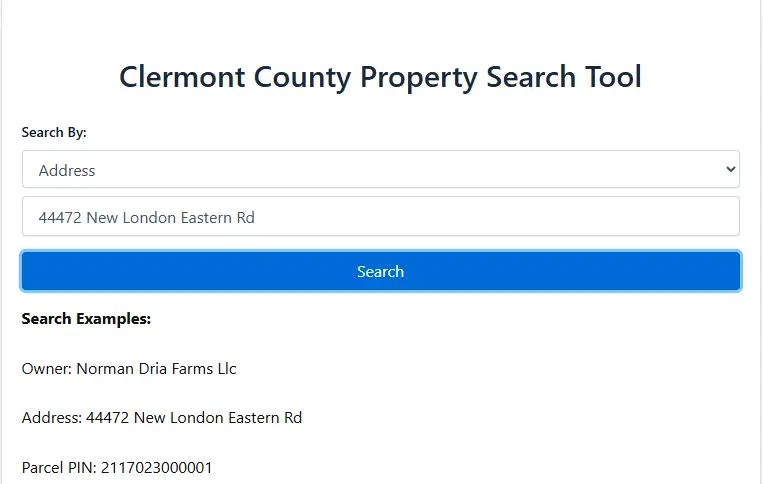
You can check property sales history in Clermont County, Ohio by using the Clermont County Auditor’s website. Search by property address, parcel number, or owner name to view past sale dates, sale prices, and transfer details. The county GIS map can also show recent sale information for nearby properties.
Property sales history is an essential part of real estate research for buyers, sellers, investors, and homeowners. Whether you want to understand market trends, confirm a property’s previous sale price, compare neighborhood values, or verify ownership transfers, Clermont County provides reliable tools that make this information easy to access.
This guide is helpful for home buyers, sellers, real estate investors, and property owners who want accurate and official sales history information before making property or financial decisions.
Why Property Sales History Matters
Property sales history shows how often a property has changed ownership and at what price. This information helps buyers understand market value, helps sellers price their home competitively, and helps investors evaluate appreciation trends.
In addition, sales history can reveal whether a transfer was a typical market sale or a non-arm’s-length transfer such as family ownership changes or estate transfers. Understanding these differences helps avoid misinterpreting a property’s true value.
Where to Find Clermont County Property Sales History
Clermont County offers official online tools that allow the public to search property sales history using verified county records. Clermont County provides several official sources where you can review historical sale prices and transfer details. These tools allow users to look up records by address, parcel number, or owner name.
Using the Clermont County Auditor Website
The Clermont County Auditor is the most reliable source for verified sales history. The auditor maintains detailed property records, including sale dates, recorded prices, and transfer types.
When you visit the auditor’s property search page, you can enter information such as an address, parcel ID, or owner name to open a complete property profile. Inside this profile, you will find a dedicated section labeled “Sales” or “Transfer History,” which displays a chronological list of previous transactions with the corresponding dates and amounts.
This is the best place to obtain official sales data because it is linked directly to the county’s tax and valuation records.
Steps to Check Sales History on the Clermont County Auditor Website
To check property sales history through the Clermont County Auditor, start by opening the auditor’s property search page. Enter the property address, parcel number, or owner name into the search bar. Once the property profile opens, scroll to the section labeled “Sales” or “Transfer History” to view previous sale dates, prices, and transfer types.
Using the Clermont County GIS Mapping System
The county GIS map is another useful tool for reviewing sales history. After searching for a property, you can click on the parcel to open its information panel. The panel typically includes the most recent sale date and sale price.
The GIS system is helpful for visual learners because it shows nearby parcels and allows users to compare sales among surrounding properties. This provides a broader view of neighborhood trends and helps identify how one home compares to others in its area. While the GIS map is useful for quick reference and visual comparison, the auditor’s website should be used for complete and official sales records.
Searching Sales History by Parcel Number
If you already know a parcel number, you can quickly pull up detailed transfer history. Parcel numbers provide the most accurate search results because each parcel ID in Clermont County is unique.
Entering the parcel number into the auditor’s search tool will open the exact property profile without needing to filter through multiple addresses or similar names. This method is ideal for investors working with data spreadsheets or buyers researching multiple properties at once. This method is especially useful for real estate professionals and investors who need accurate results without duplicate address listings.
What Information You Will Find in Sales History Records
Clermont County property sales history records typically include:
- Sale date
- Sale price
- Type of deed or transfer
- Grantor and grantee information
- Notes indicating arm’s-length or non-arm’s-length transfers
Some older records may include limited information, but most recent transfers are fully documented. Understanding the type of deed can help you interpret the sale more accurately because not every transfer reflects fair market value.
How Accurate Are Clermont County Sale Records?
The county auditor updates sales records based on official documents recorded with the county. This means the information is generally reliable. However, there may be delays between closing dates and official updates if the deed has not been processed yet.
For the most accurate and up-to-date information, the auditor website should always be your primary source. The GIS map is helpful for quick reference, but the auditor profile offers a more complete history. If a recent sale does not appear yet, it may still be in the processing stage and will be updated once the deed is officially recorded.
When You Should Check Sales History
There are many common situations where reviewing property sales history is important. Buyers may want to see whether a home has recently changed ownership and how much the previous owner paid. Sellers often review recent nearby sales to understand how to price their property competitively.
Investors rely on historical sales patterns to evaluate long-term appreciation, identify undervalued properties, and forecast market potential. Property owners may also review sale records when appealing a property valuation or understanding tax changes. Reviewing sales history at the right time can help avoid overpaying, underpricing, or misunderstanding a property’s true market value.
Conclusion
Checking property sales history in Clermont County, Ohio is a simple process when you know where to look. The county auditor’s website provides the most complete and reliable transfer history, while the GIS system offers a fast and visual way to view recent sale information. By using both tools together, you can fully understand past transactions, current market trends, and how a property has changed in value over time.
This information is valuable for buyers, sellers, investors, and homeowners who want accurate insights into local real estate patterns.
Frequently Asked Questions
How can I find property sales history in Clermont County?
You can search the Clermont County Auditor website using an address, owner name, or parcel number to view complete sales and transfer details.
Does the GIS map show full sales history?
The GIS system usually shows the most recent sale but may not include every historical transaction. The auditor site provides a full history.
Is the sale price on county records always accurate?
Yes, sale prices come from recorded deeds. However, updates may take time if the transfer is still being processed.
Can I look up sales history using only a parcel number?
Yes, parcel numbers provide the fastest and most accurate search results because each parcel has a unique identifier.
Why are some older sales records incomplete?
Older transfers may not include full sale amounts or deed details because digital record-keeping was not always as detailed as it is today.
Related Clermont County Property Resources
- Clermont County Property Search
- Clermont County GIS Maps
- How Property Taxes Work in Clermont County